Loading page
SharePoint & OneDrive Document Management
by TechnoVision · Odoo App
Attachments land in SharePoint. Your filestore stops growing.
Odoo puts every attachment in its filestore, which is fine until it is not: the backup takes an hour, the disk fills up, and the documents your business cares about sit in a directory nobody can browse, search or share without going through Odoo. Meanwhile your company already has a document system.
One-off licence per Odoo instance. The store bills in its own base currency, so checkout may differ by a few cents. That is the add-on price. Installation and support are optional and priced separately.
- Odoo 18 & 19
- Community & Enterprise
- Depends on base only
- Version 18.0.1.0.2 · 2026-09-11
Security Center
Live82
Score
1.2k
Events / 24h
3
Alerts
Export volume · 14 days
Unusual export detected
res.partner · 4,812 rows · outside business hours
Illustrative UI. Product screenshots to be dropped into this frame.
What it does
Filed automatically, and never the only copy
Filed as they arrive
One rule per model, with a folder template - Odoo/{model}/{year}/{record} - so a contract can be found a year later by somebody who knows nothing about Odoo.
Asynchronous, deliberately
Calling Microsoft while saving a record would mean saving an invoice fails when SharePoint is slow. Files are queued and a scheduled job sends them.
Reclaims the filestore, carefully
The Odoo copy is deleted only when Microsoft has returned an item id and a link - never on a call that merely did not error. Off by default.
A log of everything that left
The file, the record, who attached it, the folder, the link, the size, the error if there was one, and whether the Odoo copy still exists.
Nothing filed on install
No rule, no filing. A module that started shipping a customer’s documents to a third party on the strength of being installed would be an accident.
Try it with no app registration
The simulated transport records exactly which files would be sent and where each would land, and sends nothing. Evaluate it before asking IT for anything.
Pricing & Services
Three things you can pay for. Only the first one is required.
The add-on licence is the product. Installation and a support plan are separate, optional, and neither is added to anything unless you choose it. The licence is bought into your own account, so you own it outright whether or not you ever buy a service from us.
Add-on License
RequiredThe module, bought from the Odoo Apps Store into your own account.
$85
one-off, per Odoo instance · paid to the Odoo Apps Store
Buy Add-onIncludes
- The module itself, for one Odoo instance, with no user limit and no expiry
- Every 18.0 release of the module, including security fixes
- The module documentation, in the module and on this site
- Defect fixes and help with configuration, at no extra cost and with no support plan required
Not included
- Installation on your instance, and configuration against your data
- Changes to the module for your own requirements
- Migration of the module or your data to another Odoo series
- Work on your Odoo, your server, your network, or on other vendors’ modules
Installation & Configuration
OptionalA Microsoft 365 app registration, Graph permissions, and a tested upload path.
$399
one-off · paid to TechnoVision
Add InstallationIncludes
- Remote installation on your instance
- Credential and endpoint configuration for the external service
- Compatibility verification against your Odoo version and edition
- Connection testing against the vendor, before go-live
- Testing of the main workflows end to end
- A short written handover, including what you must renew or rotate
- 30 days of support after handover
Not included
- Changes to the module’s behaviour for your own requirements
- Data import, data cleaning or historical back-fill
- Anything the external vendor charges for — certificates, accounts, gateway fees
- Approval by the external party: we configure and test, they decide
- Work on your Odoo, your server or other vendors’ modules
Support Plan
OptionalTwelve months of updates and help with the module, on top of what every licence already includes.
$240
per 12 months · paid to TechnoVision
Choose SupportIncludes
- Twelve months of module updates, including security fixes
- Configuration support by email
- Priority handling: your ticket is looked at before unpaid enquiries
- Help reproducing and reporting a defect, and a fix or a workaround
Not included
- Your Odoo, your server, your network, your backups, or other vendors’ modules
- Custom development or changes to how the module behaves
- Migration to another Odoo series — 18.0 to 19.0 is a project, not a ticket
- On-site attendance, and work outside the hours below
- Anything an external vendor charges for
What is included with every licence, at no extra cost
A support plan adds to what you already have. It never replaces it: defect fixes and help with the module stay free for every licence holder, plan or no plan.
- Defect fixes, at no charge, for the life of the 18.0 series
- Help when the module does not behave as its description says it does
- Answers to configuration questions about the module itself
- Security fixes, released to everyone whether or not they hold a support plan
Support plan terms, as numbers rather than adjectives
- Up to 10 support requests in the twelve months
- Up to 4 hours of remote assistance in total
- One Odoo minor-version upgrade of the module, within the same series
- Response within 2 business days, Sunday to Thursday, Cairo time
- Covers the module. It does not cover your Odoo, your server, your network, or work on other modules.
- The plan runs for 12 months from the day it starts and then stops. It renews only if you ask us to renew it — nothing renews automatically and no card is stored.
Supported: Odoo 18 and 19, Community and Enterprise. Licensed per Odoo instance, with no user limit and no expiry. Prices exclude any tax that applies where you are, and we tell you before you pay if any is due.
Demo
0:13 of the real thing
Recorded from a running Odoo 18 with real records. No slides, no mock-ups, and nothing sped up.
Screenshots
Product gallery
4 captures of the shipped product: where every document went, a filing rule, one filing, the tenant.
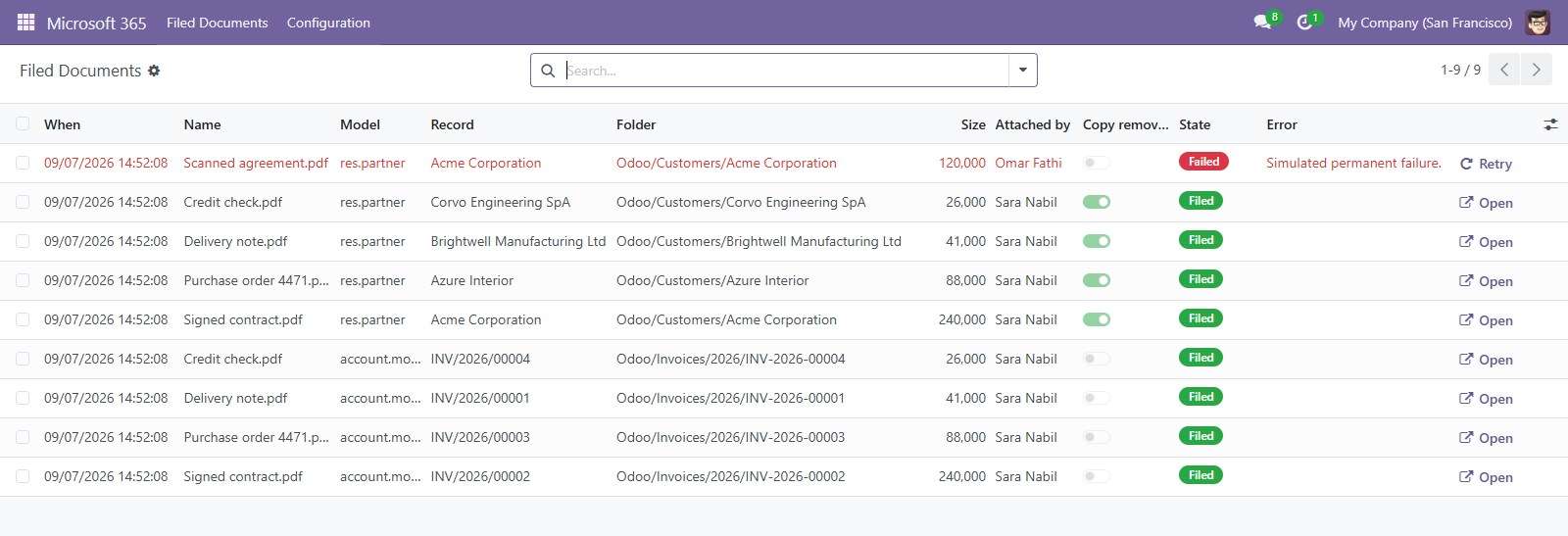
Where every document went
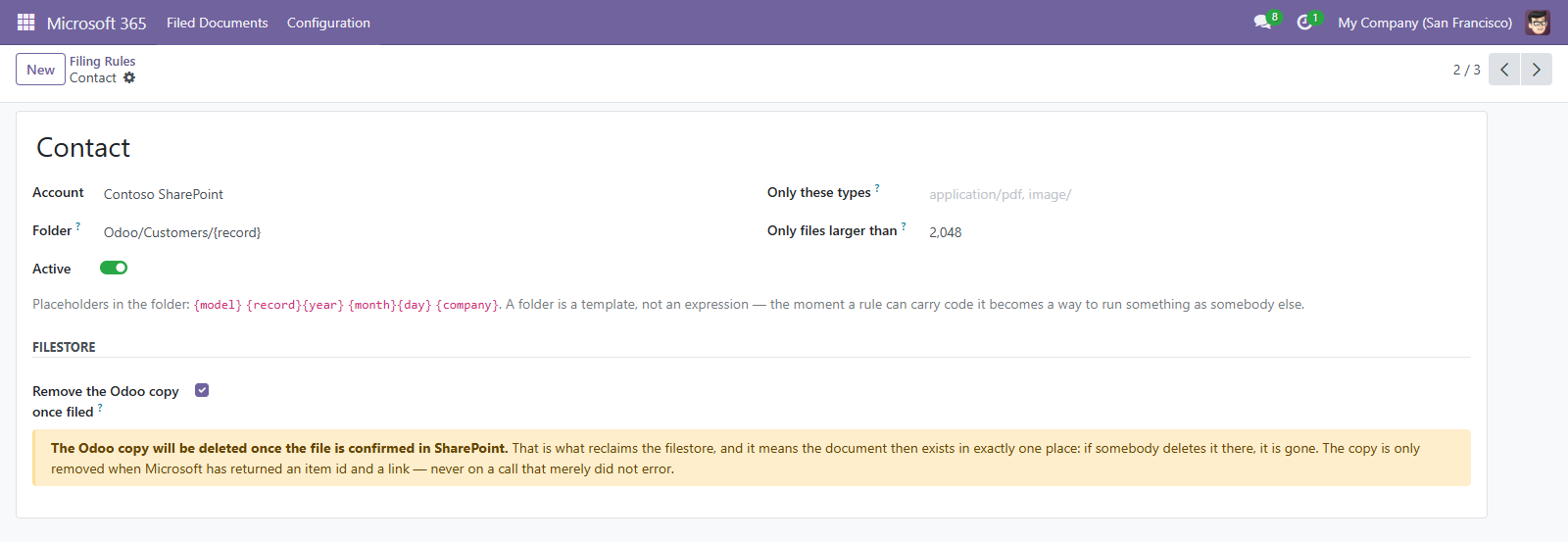
A filing rule
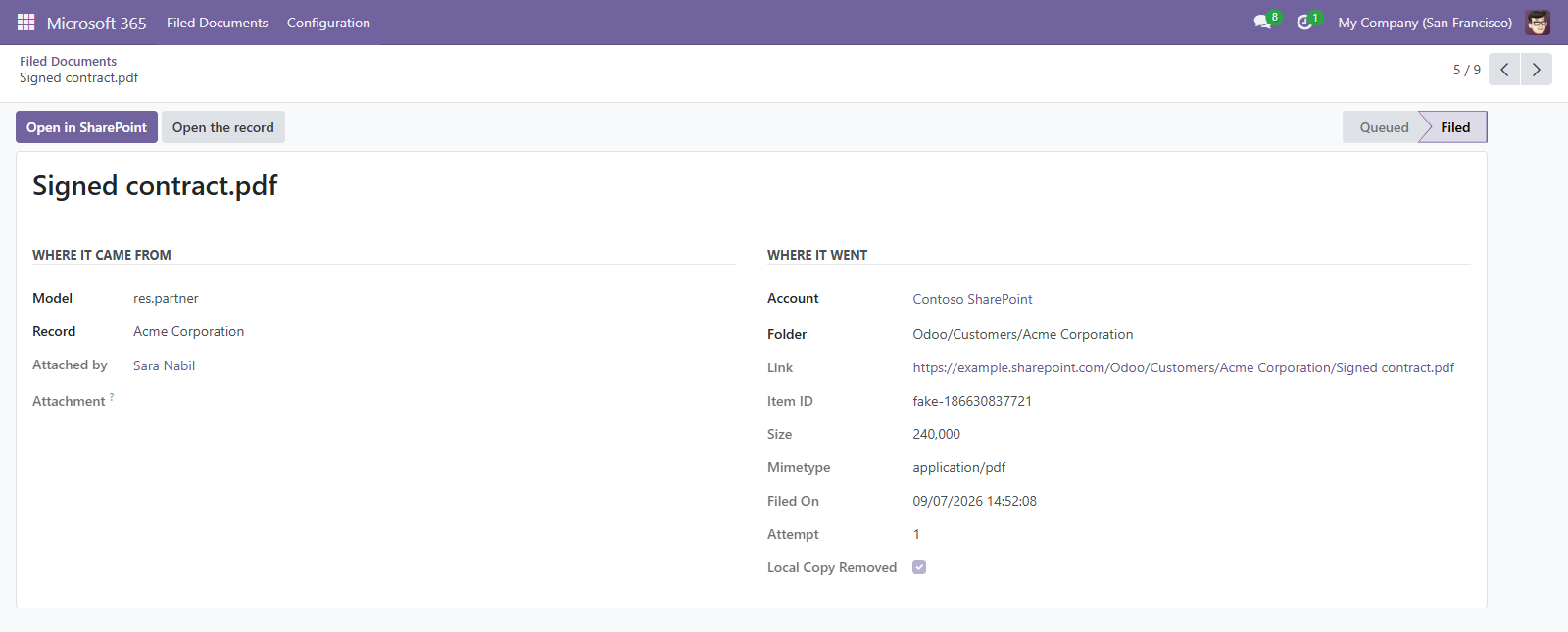
One filing
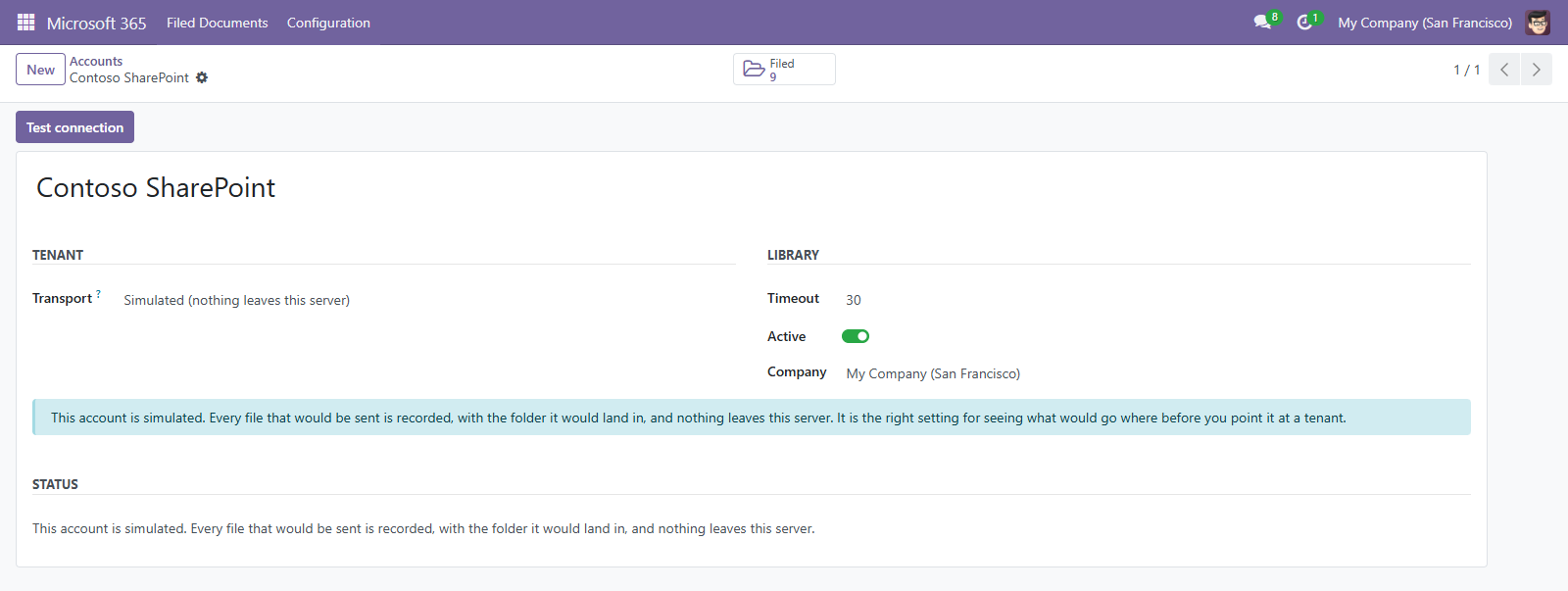
The tenant
How it works
Installed in minutes, useful the same day
- 1
Install and stay simulated
Set up your rules against the simulated transport and look at what would be sent.
- 2
Register an app in Entra
Files.ReadWrite.All or Sites.ReadWrite.All, admin-consented. Client credentials, so the nightly job does not need anybody signed in.
- 3
Pick a library
Odoo asks Microsoft which libraries the app can see, so nobody has to go and find a drive id.
- 4
Watch the log
Every filing, with the folder it landed in. Turn on copy removal per rule once you trust it.
FAQ
Questions we get asked
Only if you tick Remove the Odoo copy, per rule, and only after Microsoft confirms the file with an item id and a link. It is off by default.
Nothing visible. Files stay queued and the next run of the scheduled job sends them. Nobody saving a record ever waits on Microsoft.
No. It files documents into SharePoint. Changes made there do not come back.
Graph requires an upload session above that size, which is a different protocol. A truncated file in a document system is worse than a refused one, so it is refused with an explanation.
The module itself, for one Odoo instance, with no user limit and no expiry; every 18.0 release of the module, including security fixes; the module documentation, in the module and on this site; and defect fixes and help with configuration, at no extra cost and with no support plan required. It is a one-off licence for one Odoo instance, with no user limit and no expiry. It does not include installation on your instance, and configuration against your data; changes to the module for your own requirements; migration of the module or your data to another Odoo series; and work on your Odoo, your server, your network, or on other vendors’ modules.
No, and it is not hidden in the price either. Installation and configuration is a separate, optional service at $399 one-off. It covers remote installation on your instance; credential and endpoint configuration for the external service; and compatibility verification against your Odoo version and edition. If you or your partner install Odoo modules already, buy the licence on its own and skip it — most buyers of a module this size do.
Odoo 18 and 19, on Community and Enterprise. We do not claim a series until there is a branch for it, its tests pass on that series, and somebody has run it there — so the list on this page is what is actually supported rather than what is planned.
Twelve months of module updates, including security fixes; configuration support by email; priority handling: your ticket is looked at before unpaid enquiries; and help reproducing and reporting a defect, and a fix or a workaround. It runs for twelve months at $240 and is bounded by stated limits rather than by the word "reasonable": Up to 10 support requests in the twelve months; up to 4 hours of remote assistance in total; one Odoo minor-version upgrade of the module, within the same series; response within 2 business days, Sunday to Thursday, Cairo time; and covers the module. It does not cover your Odoo, your server, your network, or work on other modules.. The plan runs for 12 months from the day it starts and then stops. It renews only if you ask us to renew it — nothing renews automatically and no card is stored. It does not cover your Odoo, your server, your network, your backups, or other vendors’ modules; custom development or changes to how the module behaves; migration to another Odoo series — 18.0 to 19.0 is a project, not a ticket; on-site attendance, and work outside the hours below; and anything an external vendor charges for.
No, and this is the line worth being clear about. Defect fixes, at no charge, for the life of the 18.0 series; help when the module does not behave as its description says it does; answers to configuration questions about the module itself; and security fixes, released to everyone whether or not they hold a support plan — all of that comes with the licence, for every buyer, at no extra cost and whether or not a plan is ever bought. A paid plan adds updates, priority over unpaid enquiries and an allowance of assistance hours on top. It never takes anything away.
No, in any of the three options. A change to how a module behaves, a migration between Odoo series, and connecting a system we do not publish a connector for are each their own piece of work, quoted on their own. They are listed as exclusions on the cards rather than left to be discovered: they are the three things buyers most often assume are covered.
Use the buttons in the Pricing & Services section above. Both have a price, so the button takes you to a short form, shows you the total and what it covers before you commit, and creates a numbered order we reply to. No card details are taken on this site, and nothing is added to anything unless you choose it.
Get SharePoint & OneDrive Document Management
Install from Odoo Apps, or talk to us about a guided rollout across multiple companies.